The Problem It Solves
Every Odoo implementation eventually runs into the same friction: a business wants to search by a custom field, or group records differently, or see an extra piece of data on their kanban cards. The traditional answer is to write an inherited view in XML, restart the server, and wait for a developer. That friction adds up quickly across a live deployment.
Dynamic Filter eliminates that cycle entirely. It gives administrators a point-and-click interface to extend search bars, inject custom filter expressions, define group-by sections, and push additional fields into kanban cards — all without writing XML, restarting anything, or leaving the Odoo UI.
"All changes are live instantly — no XML editing required."
What the Module Provides
Add stored fields from any model to the search dropdown. Control ordering with a sequence number and override labels.
Define Odoo domain expressions as named, clickable filters — with a custom label and section heading.
Expose any storable field as a group-by choice, displayed under a labeled section in the search bar.
Inject extra rows into kanban cards, showing labels and formatted values including boolean fields.
How It Works Under the Hood
The module doesn't monkey-patch the Odoo server or manipulate JS. Instead it leverages Odoo's native view inheritance system — the same mechanism official addons use — but generates the XML programmatically at runtime.
Architecture overview

When you click Generate View, the module locates the base search (or kanban) view for the selected model, builds an XPath-based inherited view as an XML string using lxml.etree, and writes it to ir.ui.view with priority=99. The next time any user opens that model's view, Odoo composes the inheritance chain and the dynamic additions appear seamlessly.
Conversely, clicking Delete View simply calls unlink() on the generated record — the changes vanish without any residue.
Sequence-based field positioning
The search field ordering has a clever two-tier system baked in. Fields with a sequence below 100 are injected before the first native search field (they appear at the top of the dropdown). Fields with sequence ≥ 100 are appended inside the <search> element (they appear at the bottom). Here's the relevant logic:
# sequence < 100 → insert BEFORE first native field
if first_native_field:
    xpath_top = etree.SubElement(
        root, "xpath",
        expr=f"//field[@name='{first_native_field}']",
        position="before"
    )
    # Reversed so lower-seq ends up physically first
    for line in reversed(list(top_lines)):
        etree.SubElement(xpath_top, "field", name=line.field_id.name, ...)

# sequence >= 100 → append inside <search>
xpath_bottom = etree.SubElement(root, "xpath", expr="//search", position="inside")
for line in bottom_lines:
    etree.SubElement(xpath_bottom, "field", ...)
Data Models at a Glance
The module introduces five Odoo models across two configuration families:
Search / Filter / Group By family
dynamic.groupby.config — the parent record. Holds the target model, group-by fields (Many2many to ir.model.fields), and a reference to the generated view.
dynamic.groupby.search.line — each row is one search field to inject, with a sequence, optional custom label, and a field reference.
dynamic.groupby.filter.line — each row is a named filter with a domain string (e.g. [("active", "=", True)]) and a sequence.
Kanban family
dynamic.kanban.config — selects the target model and holds a reference to the generated kanban view.
dynamic.kanban.field.line — each row specifies a field and optional label to render as a row in the kanban card body.
Step-by-Step Usage
Add dynamic_groupby to your addons path and install it from the Apps menu. It depends only on base, web, and mail.
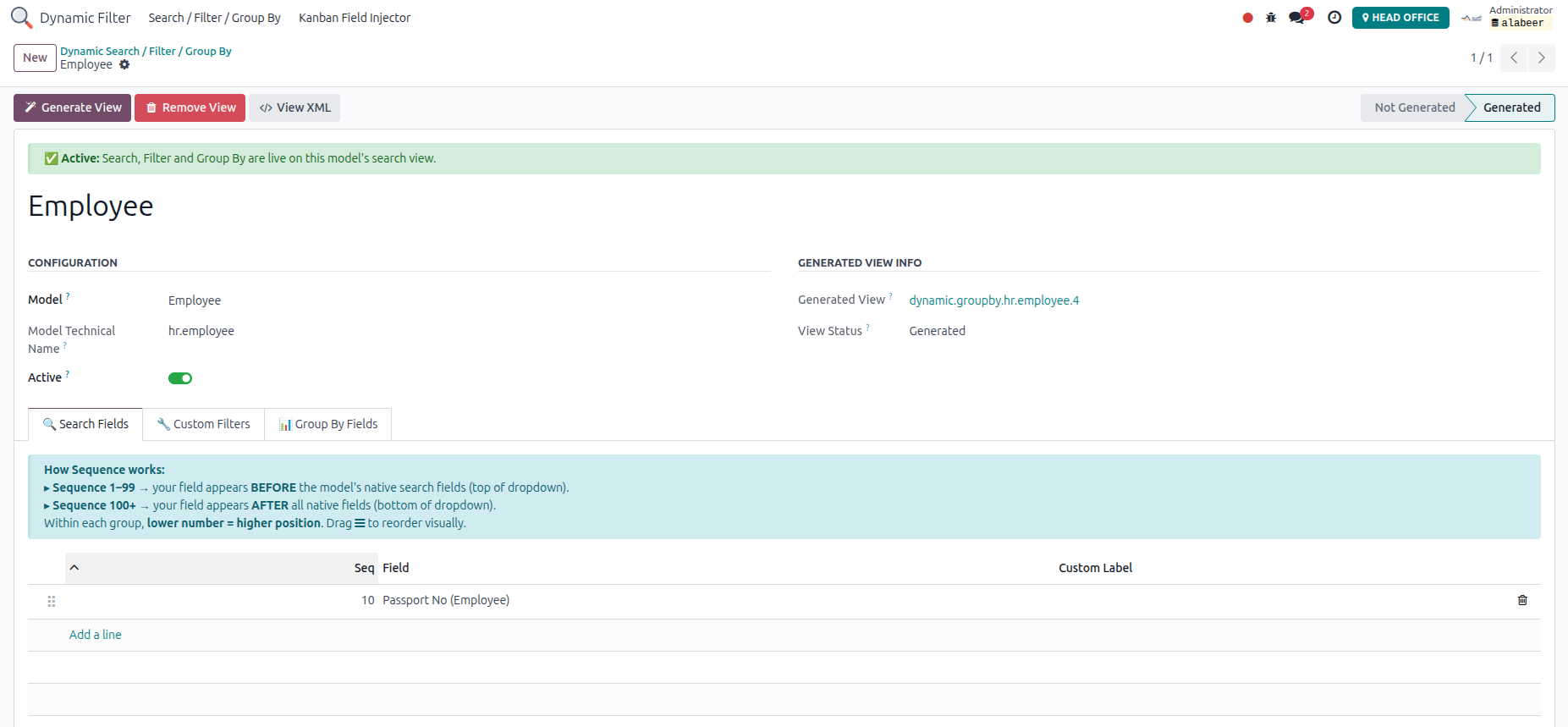
Navigate to Settings → Dynamic Groupby → Search/Filter Config and create a new record. Choose the target model from the dropdown.
Use the three tabs — Search Fields, Custom Filters, Group By Fields — to add exactly what you need. Set sequences to control ordering.
The module builds and saves an inherited view. A success notification confirms it. Refresh the target model's list or form view to see the changes live.
Navigate to Dynamic Groupby → Kanban Config, pick a model, add field lines, and generate a kanban view the same way.
The module only surfaces stored fields (store=True) and excludes binary, HTML, and relational One2many/Many2many types from selection. This prevents generating invalid search views that would crash the ORM.
Auto-Regeneration on Save
One especially thoughtful behavior: the module overrides write() on both config models. When a relevant field changes (like adding a new search line or toggling the Active flag), it automatically calls action_generate_view() to keep the generated view in sync — no manual regeneration step needed.
def write(self, vals):
    result = super().write(vals)
    trigger_fields = {
        'groupby_field_ids', 'is_active', 'group_label',
        'model_id', 'search_line_ids', 'filter_line_ids', 'filter_label',
    }
    if trigger_fields.intersection(vals.keys()):
        for rec in self:
            if rec.generated_view_id:
                if rec.is_active and has_content:
                    rec.action_generate_view()
                elif not rec.is_active:
                    rec.action_delete_view()
    return result
Deactivating a config automatically removes its generated view. Deleting the config record does the same, leaving the view registry clean with no orphans.
Kanban Card Rendering
For kanban views the module uses two XPath operations: one to declare the fields inside the <kanban> element (required by Odoo so the fields are fetched from the server), and a second to inject <li> rows inside the .oe_kanban_details ul element with QWeb expressions.
Boolean fields get a special treatment — they render as "Yes" or "No" using a ternary QWeb expression rather than the raw true/false value, which is a nice UX touch. Each row uses inline flexbox so the label and value are nicely spaced, and a padding-right: 50px guard prevents overlap with the action icons in kanban cards that have them (e.g. the HR Employee kanban).
Who Should Use This
Dynamic Filter is a great fit for Odoo implementers and in-house administrators who need to extend views during or after a deployment without maintaining custom addon code for every minor tweak. It's particularly handy when business teams frequently discover new ways they want to search or group records, since the turnaround time goes from a developer sprint to a two-minute configuration change.
For very complex scenarios — conditional field visibility, multi-level inherited views across several addons, or non-standard kanban layouts — you may still need a custom addon. But for the vast majority of "I just want to search by this field" requests, Dynamic Filter handles it gracefully.
Summary
Dynamic Filter is a focused, well-engineered utility module. It does exactly what it promises: turns Odoo view customization into a point-and-click task. The implementation is clean — it delegates all the heavy lifting to Odoo's native view inheritance engine, handles its own lifecycle with proper CRUD hooks, and includes sensible guards against invalid field types. If you're running Odoo 17 and want to give your administrators more autonomy over how they search and visualize data, it's worth a look.
Module: dynamic_groupby | Version: 17.0.2.0.0 | Author: Md Mohiuddin | License: LGPL-3